Creating a Digital Signature with RSA, OpenSSL
 Alexander Myasnikov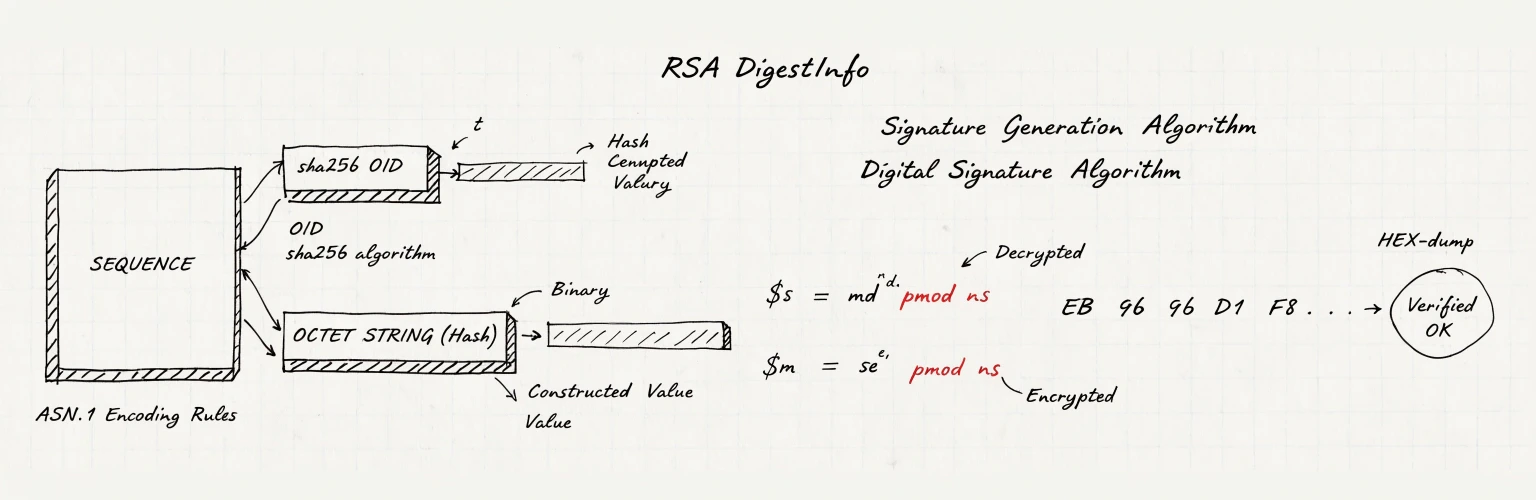
1 Creating a Digital Signature with RSA
A digital signature guarantees two things: authenticity (the message originated from the private key owner) and integrity (the message has not been altered in transit).
In this guide, we will create a signature and verify its validity.
Note: In standard encryption, the public key is used so that only the private key owner can read the data. With digital signatures, it is the opposite: the private key is used to sign, allowing anyone to verify the authenticity using the corresponding public key.
2 Creating the Digital Signature
First, let’s calculate the SHA-256 hash of the file message.txt:
❯ openssl dgst -sha256 message.txt

SHA2-256(message.txt)= eb96d1f89812bf4967d9fb4ead128c3b787272b7be21dd2529278db1128d559c
Now, we create the signature file signature.bin using the private key:
openssl dgst -sha256 -sign privatekey.pem -out signature.bin message.txtWhat happens under the hood:
- The file hash is calculated:
h = SHA256(message.txt) - A DigestInfo structure is formed in
ASN.1format, containing the hash algorithm identifier and the hash value itself. - Padding is added:
padded = PKCS#1(DigestInfo) - The signature is computed:
s = padded^d mod n, wheredis the private exponent andnis the RSA modulus.
3 Analyzing the Signature File
Let’s examine the contents of the signature file:
❯ cat signature.bin | xxd

00000000: 9a1a 483b 2317 d46e 7221 53d5 d9cd 0c52  ..H;#..nr!S....R
00000010: 8b51 1492 df8c 1840 116e 162a 5bcc f8a6  .Q.....@.n.*[...
00000020: d834 64cf 8453 4a70 bad1 164b ddb6 eb42  .4d..SJp...K...B
00000030: 7029 99a3 54f1 70f6 240a d201 c78d 224e  p)..T.p.$....."N
00000040: 7aaa 3a5f 7feb 18c4 0496 9cf7 3028 b60c  z.:_........0(..
00000050: e1af 1600 2444 d960 53e5 1628 0c3b 6b1f  ....$D.`S..(.;k.
00000060: e5d4 00c6 da20 9bed 2924 5ce3 8ce3 d529  ..... ..)$\....)
00000070: 3483 8cf1 9032 c535 cd0a 6d45 ca8b 79ff  4....2.5..mE..y.
The signature.bin file is 128 bytes, which corresponds to a 1024-bit RSA key.
Essentially, this is simply the number s = padded^d mod n in big-endian representation without any additional wrapping.
4 Verification
To verify the signature, the recipient needs three things: the original file, the signature file, and the public key:
❯ openssl dgst -sha256 -verify publickey.pem -signature signature.bin message.txt

Verified OK
If the signature does not match the file, OpenSSL will return a Verification failure error.
5 The Signature “From the Inside”
Using the public key, we can “decrypt” (recover) the signature to see exactly what was signed:
❯ openssl pkeyutl -verifyrecover -pubin -inkey publickey.pem -in signature.bin -out recovered.binThe file recovered.bin is calculated as signature.bin^e mod n (accounting for padding).
Now, let’s parse the resulting file as an ASN.1 structure:
❯ openssl asn1parse -in recovered.bin -inform DER

    0:d=0  hl=2 l=  49 cons: SEQUENCE
    2:d=1  hl=2 l=  13 cons: SEQUENCE
    4:d=2  hl=2 l=   9 prim: OBJECT            :sha256
   15:d=2  hl=2 l=   0 prim: NULL
   17:d=1  hl=2 l=  32 prim: OCTET STRING      [HEX DUMP]:EB96D1F89812BF4967D9FB4EAD128C3B787272B7BE21DD2529278DB1128D559C
We can see that the sha256 algorithm was used for the signature.
The value 0xEB96..559C exactly matches the hash of our message.txt file.
This confirms the signature was executed correctly.